Overview
Renewal planning usually becomes a spreadsheet project. Someone has to collect contract values, margin history, expected cost pressure, proposal activity, payment behavior, service issues, notes, and upcoming work for every property before a pricing conversation can even begin.
Property Command Agent does that heavy lifting across the filtered book of business. Leadership explains how the company thinks about renewals, sets the financial targets, and chooses the renewal window. AI then brings together dozens of property-level data points and prepares a reviewable packet for each eligible renewal: a recommended price increase, budget items, risk flags, supporting evidence, and a projected margin scenario.
The magic is consistency at scale. Every property is evaluated against the same leadership philosophy, while the recommendation still reflects that account's economics and relationship. Your team reviews, adjusts, and approves each plan before it becomes the basis for customer follow-through.
Where AI does the heavy lifting
The agent assembles and analyzes the property context that would otherwise live across reports, notes, and spreadsheets, including:
- Current revenue, margin, penetration, close rate, payment behavior, and open issues
- Financial, opportunity, proposal, contract, and issue history
- Service-group close rates, relationship depth, notes, planned budget items, and site visits
- The property's margin and penetration position within the full book of business
Where your team stays in control
- Leadership defines the pricing philosophy and financial targets
- Account and branch leaders review the evidence and edit the proposed plan
- An organization admin or owner approves the final customer plan
- The account team owns the customer conversation and delivery in Aspire
What You'll Need
- Access to Property Command and permission to run Property Command Agent
- A filtered property view that matches the branch, account owner, or portfolio you intend to review
- Leadership agreement on base-contract margin, whole-property margin, penetration, expected cost movement, and acceptable exceptions
- A renewal date window and, when useful, the division whose contracts should be reviewed
- An organization admin or owner available to approve final renewal plans
Start With the Property Group You Intend to Price
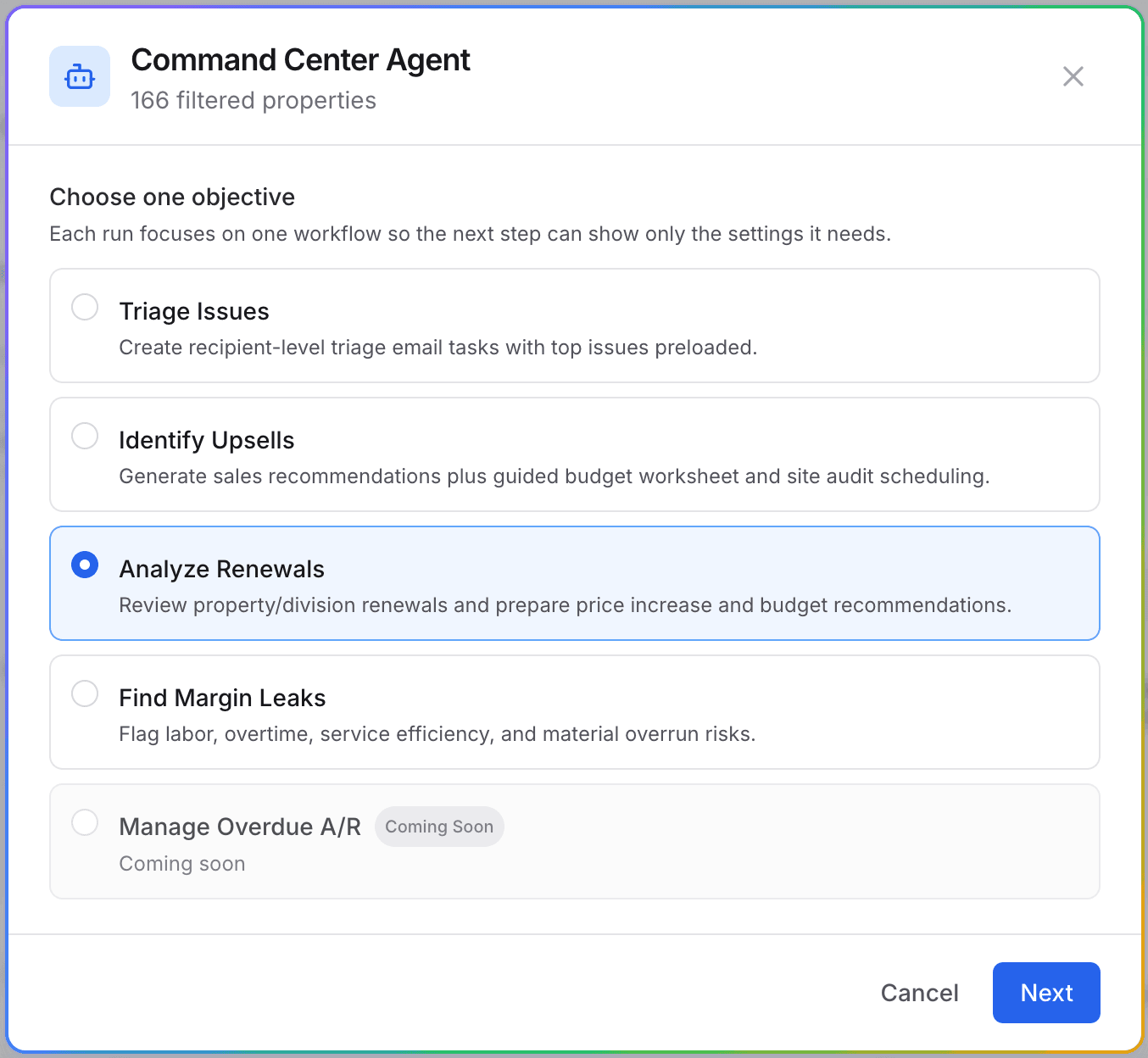
Filter Property Command to the branch, account owner, saved view, or portfolio you want to review. Select Launch Agent, then choose Analyze Renewals. The run starts from the full filtered property list and then looks for current contracts ending in your chosen window that do not already have a next contract lined up.
Confirm the filtered count
Renewal analysis uses the filtered property group, not only the visible page or checked rows. Read the count at the top of the agent before continuing.
Narrow the renewal lane
Use the contract-end window and optional division to keep the packet queue aligned to one manageable renewal cycle.
Translate Leadership's Strategy Into a Team Standard
Explain the strategy the way you would to a new account manager. State what the team is protecting, how cost pressure should affect pricing, when relationship strength should temper an increase, and which situations require leadership review. The agent uses that guidance to build every packet in the run.
Set the financial guardrails
Add the target base-contract gross margin, target whole-property gross margin, target penetration, and expected COGS increase your team should price against.
Name the judgment calls
Explain how payment history, unresolved service issues, prior increases, enhancement activity, and larger account relationships should change the posture.
Save the standard when it should apply again
Choose Save this as how my team runs renewals when this guidance and these targets should become the starting point for future analyses and scheduled runs. Leave it off for a one-time scenario.
Let AI Build the Renewal Packets
Run the analysis and open Renewal packets when it finishes. Instead of assembling one spreadsheet row at a time, your team gets a portfolio queue with the proposed increase, budget candidates, risk flags, current and projected margin, and a clear review status for each property.
A uniform strategy does not mean a flat increase. It means every property is judged by the same rules. One account may need a corrective increase, another may need only enough to cover cost movement, and a third may warrant no increase because its margin or relationship context supports that decision.
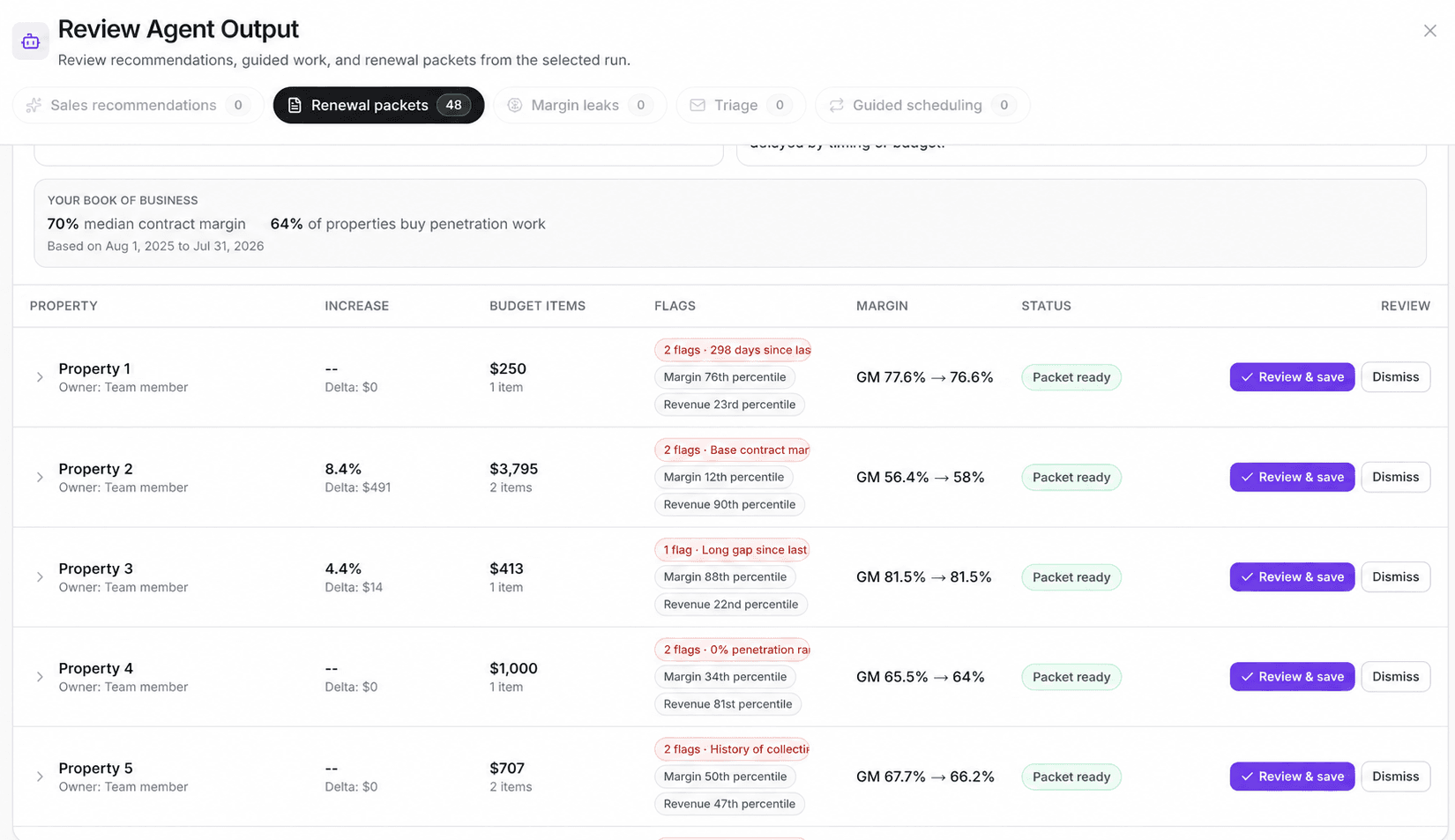
The portfolio view makes exceptions visible: leaders can scan where the recommendation or risk profile differs before opening the full packet.
Review the Evidence, Then Edit or Approve
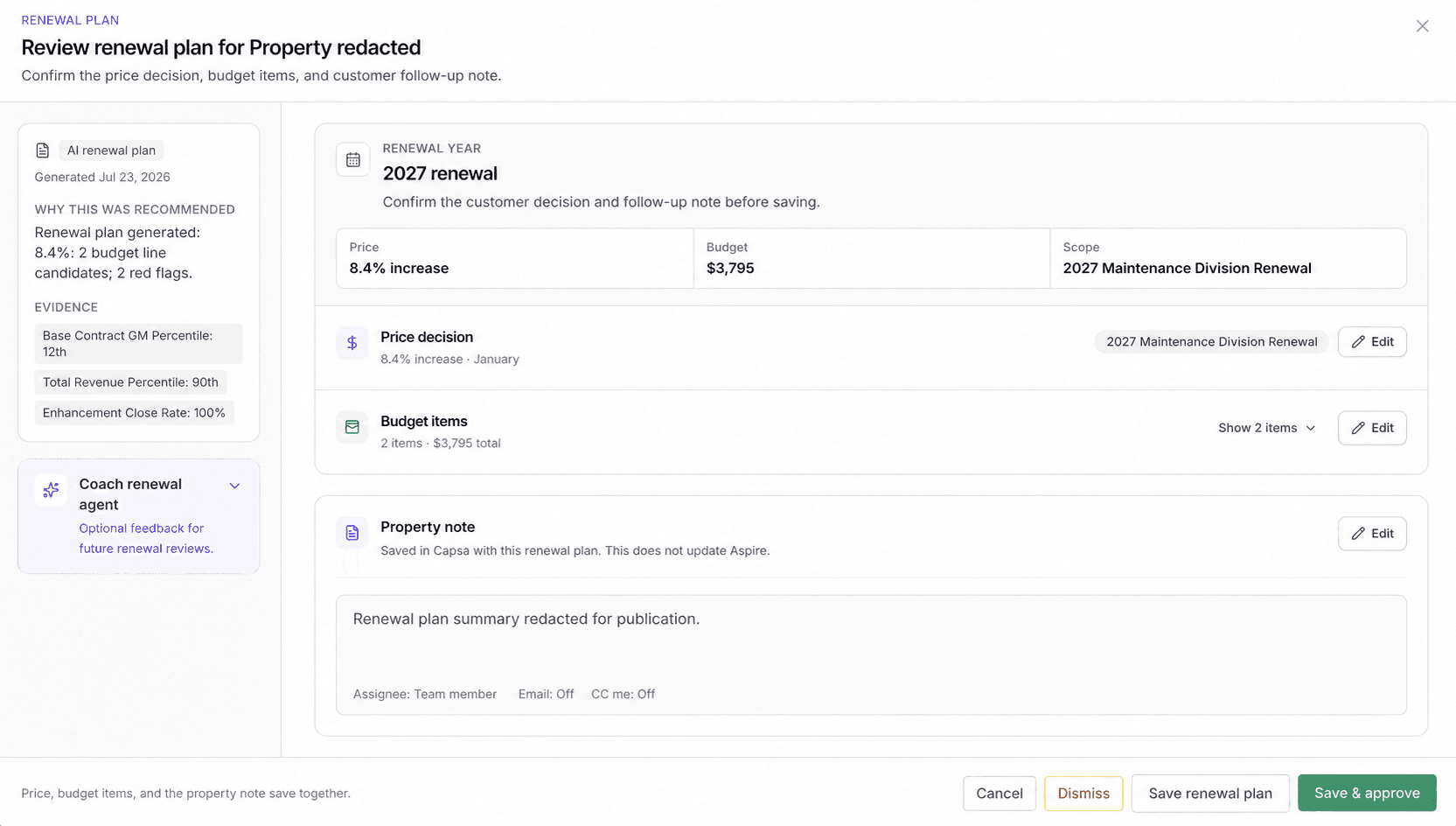
Open a packet to review why the plan was recommended. Confirm the price decision, renewal scope, budget items, and property note. Edit anything that needs local context. Dismiss the packet when the renewal is not ready or the recommendation should not become a plan.
Coach future renewal reviews carefully
Save feedback for This property when it is account-specific. Use Future renewal plans only for a durable lesson the agent should apply across later reviews.
Preserve the approval gate
Anyone with the right access can save a reviewed plan. Only an organization admin or owner can approve it and unlock the remaining execution work.
Put the Approved Plan Back Into the Operating View
After the plan is saved, Property Command shows the planned price increase, budget items, and renewal-task progress beside the contract. Leaders can see which properties have a decision and which still need work without opening a separate spreadsheet.
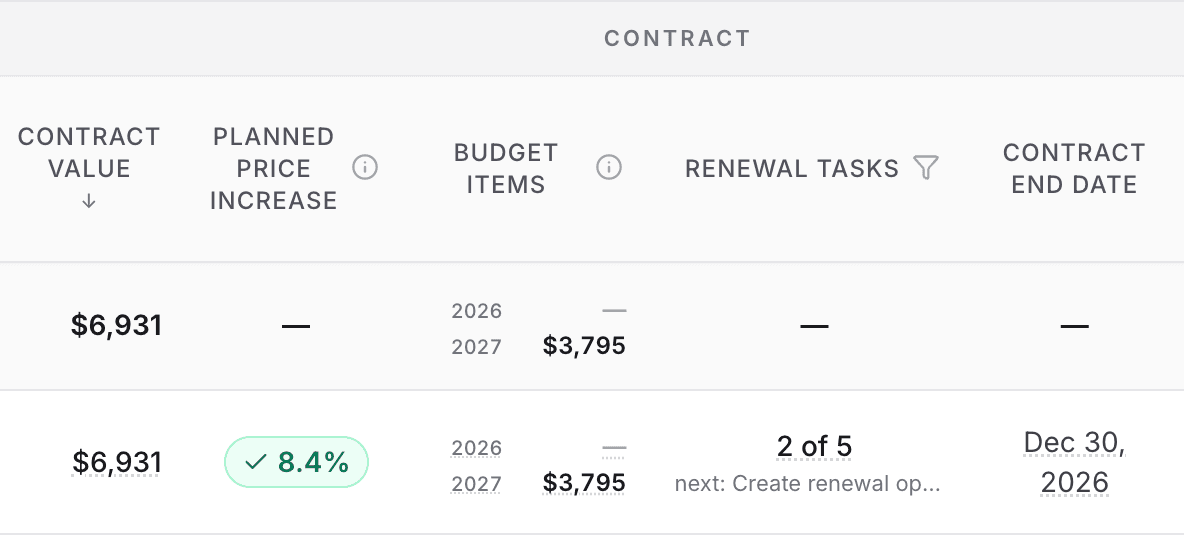
The saved plan stays attached to the property and renewal year, so the decision and its follow-through remain visible together.
Work the Renewal Through Delivery
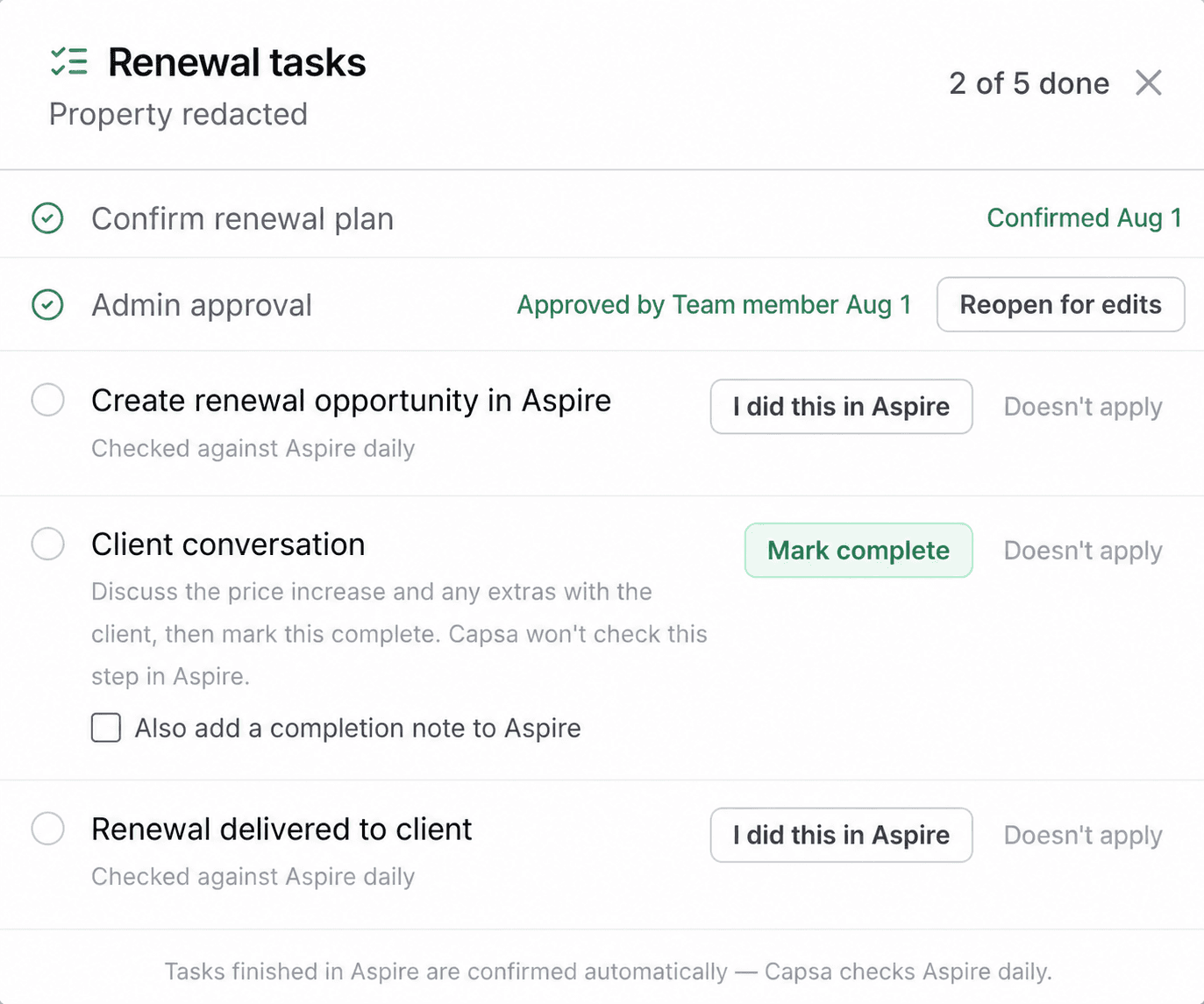
Use the renewal checklist to move from an approved internal plan to a delivered customer renewal. The standard flow covers plan confirmation, admin approval, creation of the renewal opportunity in Aspire, the client conversation, and delivery to the client.
Let Aspire confirm the system steps
Capsa checks Aspire daily for the renewal opportunity and delivered renewal. If you complete one of those steps first, mark it done and Capsa will confirm it on the next check.
Keep the human conversation explicit
The client conversation is completed by your team. Mark it complete after discussing the increase and budget items, with the option to add a completion note to Aspire.
Best Practices
- Standardize the rule, not the number. A flat increase ignores account economics. Give every property the same decision framework, then let the evidence shape the recommendation.
- Write the exceptions into the strategy. Say what should happen with unresolved service problems, chronic late payment, unusually strong relationships, prior rejections, and increases above the normal range.
- Run manageable renewal windows. A branch or division can review a focused queue well; a company-wide queue with no clear owner becomes another backlog.
- Review red flags before price. A mathematically correct increase can still be the wrong customer move when service quality or relationship risk is unresolved.
- Save only durable coaching. Property-specific context belongs to that property. Company-wide guidance should be reserved for lessons leadership truly wants repeated.
- Treat budget items as reviewable candidates. Confirm scope, timing, and customer relevance before they become part of the renewal conversation.
Recommended Operating Rhythm
At the start of each renewal cycle
Leadership reviews target margins, expected cost movement, penetration goals, and exception rules, then saves the team standard.
Weekly during renewal season
Each branch runs the next working renewal window, reviews packets by exception, and routes approved plans into customer follow-through.
During account reviews
Account managers work the renewal checklist, discuss price and budget items, and keep delivery status current in Aspire.
Monthly or after the season
Review the exceptions that caused edits or dismissals. Promote only the repeatable lessons into future-plan guidance.