Overview
Ask yourself three questions about the fourteenth-largest account in your book: who owns it, when was it last walked, and what is the next step? If the answers live in three different heads — or nowhere — the account is being managed by reaction: whoever calls loudest gets attention.
Managing with intention means those three answers exist for every property, and everyone can see them. That takes more than effort — it takes one place where health, notes, visits, tasks, and plans live together. That place is Property Command.
This playbook is the operating loop that ties the pieces together: leaders set direction from the shared view, account managers work their queues, cadences run automatically, and everything the team learns stays on the property. Each piece has its own detailed playbook, linked throughout.
What You'll Need
- Property Command access for owners, branch leaders, and account managers — the loop works because everyone sees the same thing
- Clear account ownership in Aspire, so work can be routed to the person who owns the relationship
- A standing weekly account conversation to anchor the rhythm
- The Property Command digest enabled for the leaders who should start their week from it
Leaders: Start the Week from the Shared View
The week starts with the digest in your inbox and the health view on the screen. Between them, ownership and branch leadership agree on the short list: which properties need attention, who owns each one, and what done looks like by Friday. Fifteen minutes — because the signals are already assembled, the meeting spends its time on decisions instead of report-building.
See Monitor Property Health for the review itself and Run Your Week from the Digest for the inbox rhythm.
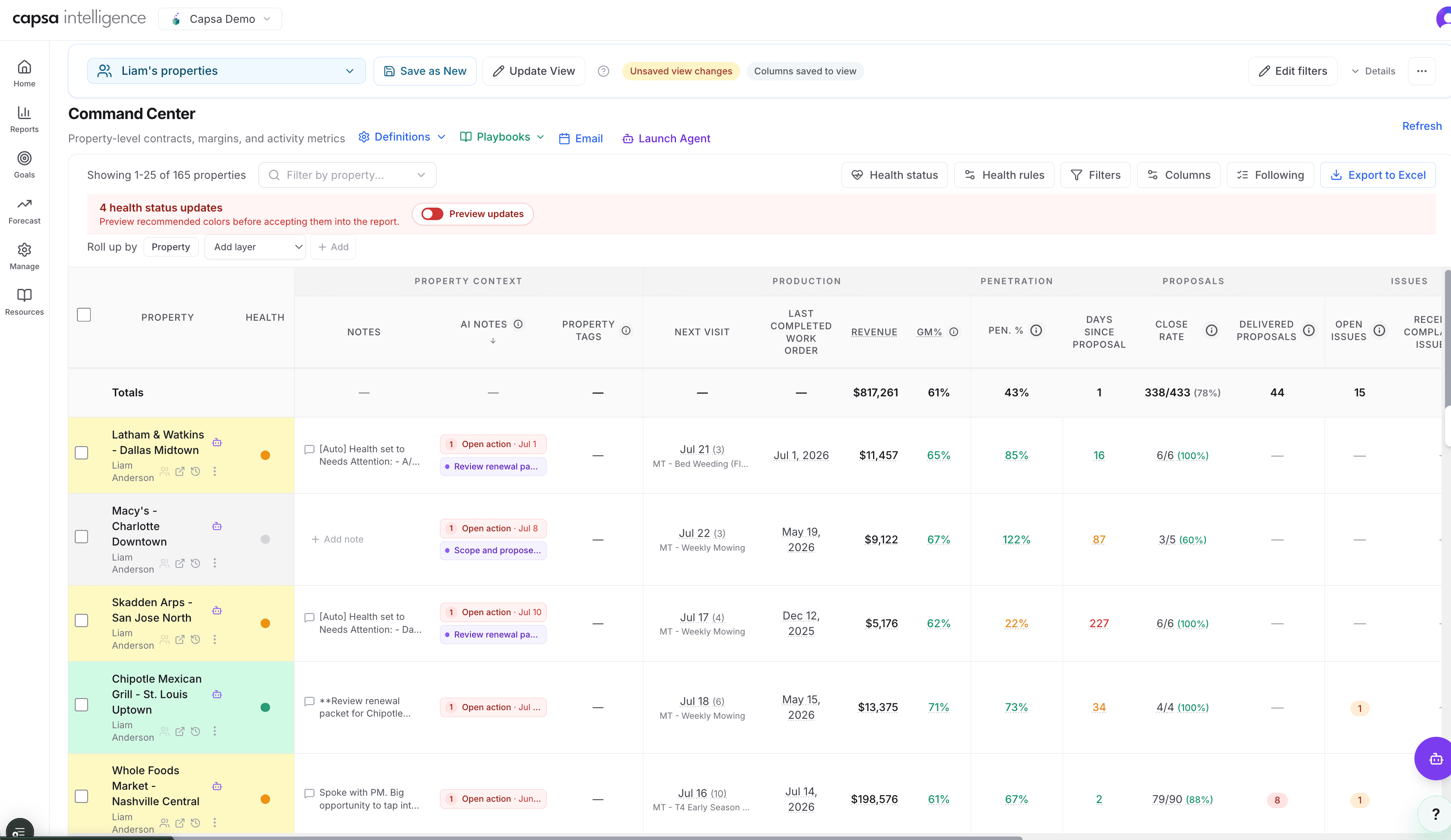
The shared view every leader starts from. Health color, open notes, recommendations, upcoming work, and the account owner all sit on one row — so the weekly conversation is spent on decisions, not on assembling reports.
Account Managers: Work the Queue, Not the Memory
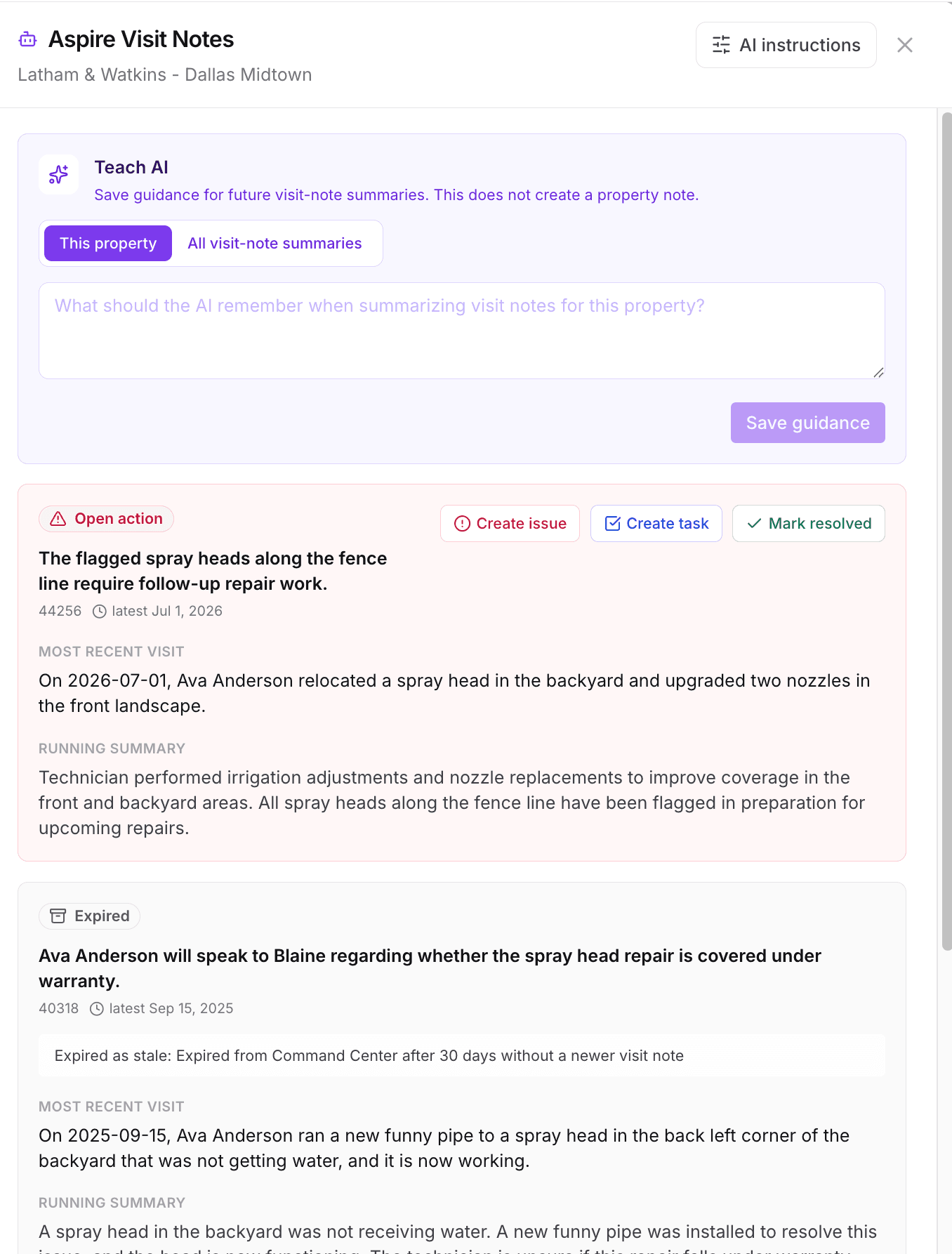
Account managers open the same property list filtered to their book. Visit notes from the field surface as open follow-up actions; AI recommendations sit in the same queue. Each item gets a decision — handle it, assign it, or close it with a note — so nothing depends on someone remembering a conversation from three Tuesdays ago.
See Review Visit Notes and Manage AI Notes for the queue workflows.
Make the Proactive Work Automatic
Intention shows up as cadence. Decide how often each tier of the book gets a site walk or check-in, schedule it once for the whole tier, and the tasks arrive in Aspire on schedule — assigned to each property's account owner. The proactive work stops competing with the urgent work for calendar space.
Keep Everything the Team Learns on the Property
This is what makes the loop compound. Notes written in Property Command sync to Aspire, and Aspire notes appear in Property Command — one shared record, whichever system someone is standing in. Budget items and price recommendations captured during walks stay on the property for planning season. When renewal time comes, the property already tells its own story: visit history, resolved issues, documented needs, pricing evidence.
See Use Property Notes in Property Command for the shared account history and Capture Budget Items All Year for planning context.
The Companion Playbooks
Monitor Property Health
The shared view leaders scan first
Run Your Week from the Digest
The rhythm that starts each week
Review Visit Notes
The account manager triage queue
Manage AI Notes
Recommendations and follow-ups in one queue
Use Property Notes
The shared history behind account decisions
Schedule Recurring Site Walks by Tier
The cadence that matches account value
Capture Budget Items for Next Year
Turn observations into next year's plan
Recommended Operating Rhythm
- Weekly (leaders): digest review, health scan, agree on the short list and owners.
- Daily or twice weekly (account managers): work the visit-note and recommendation queue for your book; close items with a note or a task.
- During every site walk: capture budget items and pricing observations on the property before leaving it.
- Quarterly: review tier assignments and visit cadences; adjust schedules as accounts change hands or contracts renew.